Scan · Price · Track

Identify Any Trading
Card Instantly

Point your camera at a card. TCGBrain names it, shows what it is worth right now, reads its condition — and files it into your collection before you have put it back in the sleeve.

Pokémon TCG Magic: The Gathering Yu-Gi-Oh!
Free To download
7 Days Premium free trial
Seconds Per identification
Card matched Set · Number · Rarity
Market price Live, with history
AI condition Before you sell
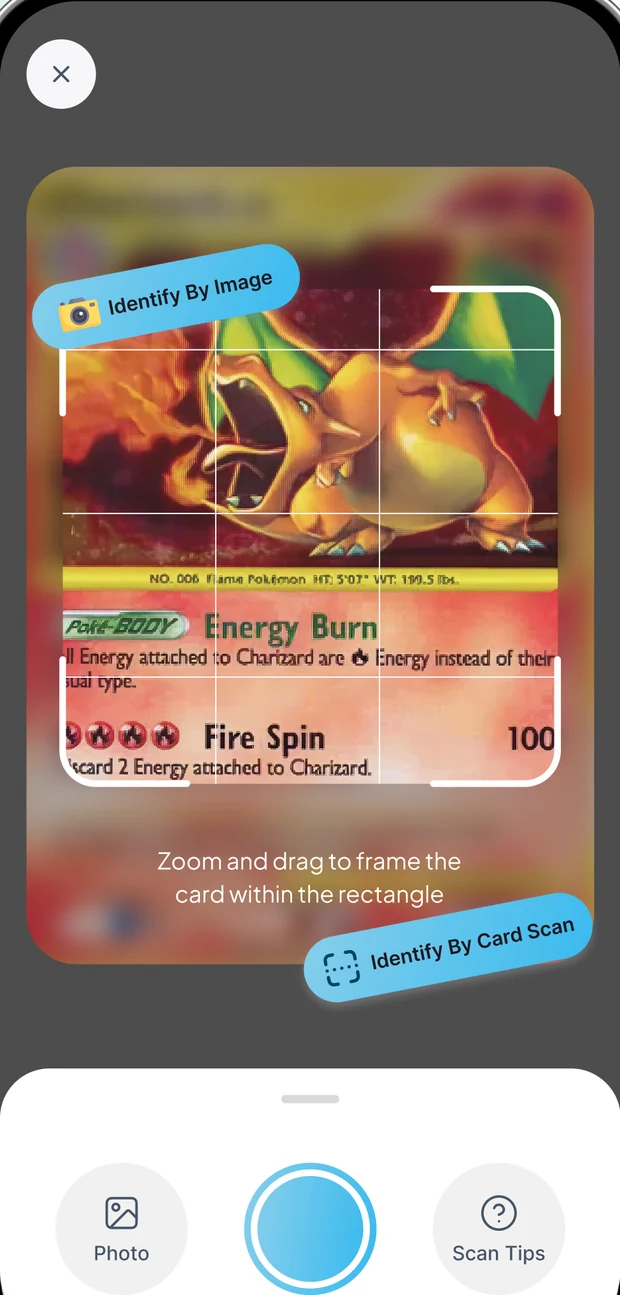
TCGBrain scan screen framing a trading card inside the capture rectangle
3
Card games supported
1 Tap
To identify a card
365D
Of price history
2
Languages in app
Three games, one scanner

Built for the cards you actually collect

TCGBrain recognises the three biggest trading card games — and treats each one properly, with the right sets, numbering and rarity language.

Pokémon TCG

From base-set holos to modern ex and VMAX pulls. Get the set, the card number, the rarity and what the card is trading for right now.

Magic: The Gathering

Commander staples, format sleepers and rare printings. Identify the exact version you are holding before you trade it away.

Yu-Gi-Oh!

Set codes, rarities and reprints sorted out for you — so an LOB-001 never gets mistaken for a later printing again.

How it works

Three steps, about ten seconds

No set lists to memorise, no price guides to cross-reference. Frame the card and let the app do the rest.

1

Snap the card

Zoom and drag until the card sits inside the rectangle, then tap once. Working from an existing photo instead? Pick it straight from your library.

2

Get the match

The card comes back named, with its set, number, rarity and a match confidence — plus an AI-assisted read on its condition and collectibility.

3

Track the value

Save it to a binder and the card starts tracking itself — market price, movement over 30, 90 or 365 days, and your portfolio total.

Everything in the box

More than an identifier — a collector's toolkit

Scanning is the front door. What keeps collectors in the app is everything that happens after the match.

Unlimited card scans

No daily limits and no counters to watch. One snap, instant ID — scan a whole box in an evening.

Premium

Live market prices

Real-time market data rather than an outdated catalogue, with values compared across TCGPlayer, CardMarket and eBay.

Premium

AI condition estimates

Pre-screen a card before you pay for professional grading, so only the ones worth submitting get sent.

Card Photo AI Enhancer

Sharpen a dim or blurry card photo before it goes to the identifier — better input, better match.

Browse & search

Look a card up by name, filter by game, and open the same detail view you get from a scan.

Explore & collector guides

Market analysis, deck tech and spot-the-fake guides, kept in a feed you can favourite and come back to.

Ad-free experience

Clean scanning with zero interruptions — nothing between you and the card in front of you.

Premium
Market data

See real card values, fast

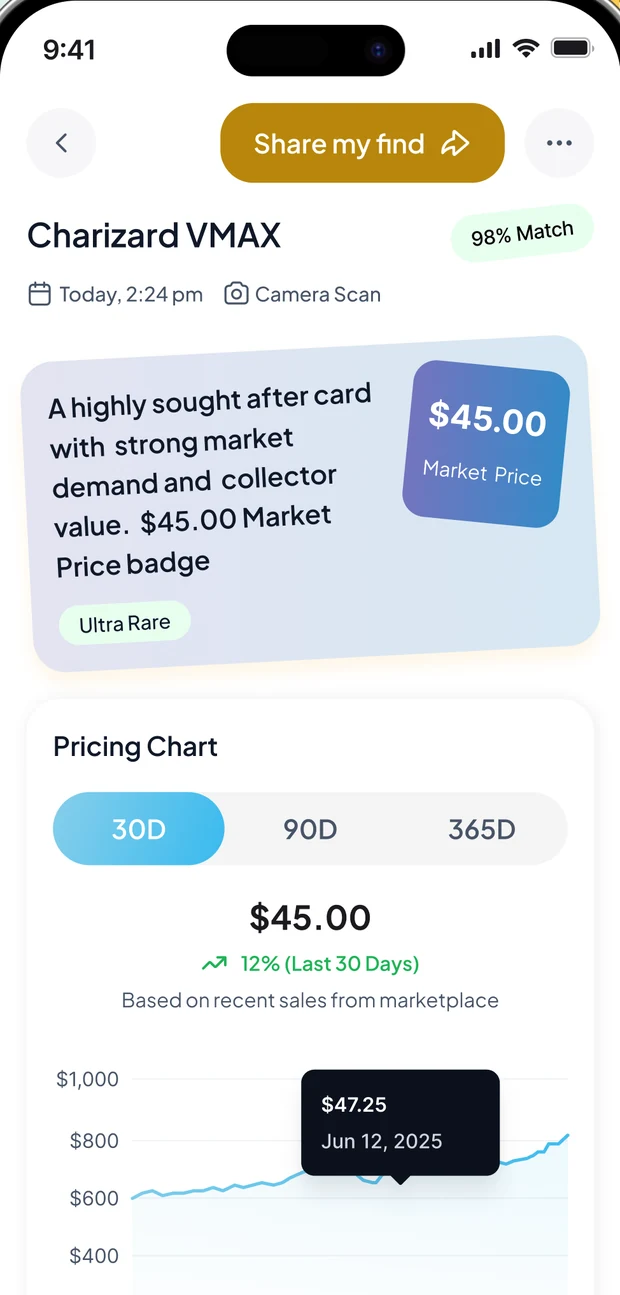
Every identified card opens on what matters: the market price, the rarity, and whether the card is climbing or cooling. Switch between 30-, 90- and 365-day windows and tap any point on the chart to read the price on that date.

  • Market price up front Not buried three taps deep — it is the first thing on the card.
  • 30D · 90D · 365D history Based on recent marketplace sales, with the movement over the window called out.
  • Rarity and demand Ultra Rare, holo, first edition — the attributes that actually move the price.
  • Compared across marketplaces TCGPlayer, CardMarket and eBay values in one place instead of three tabs.
TCGBrain card screen showing the market price badge, rarity tag and a 30-day pricing chart
AI condition

Know the condition before you buy or sell

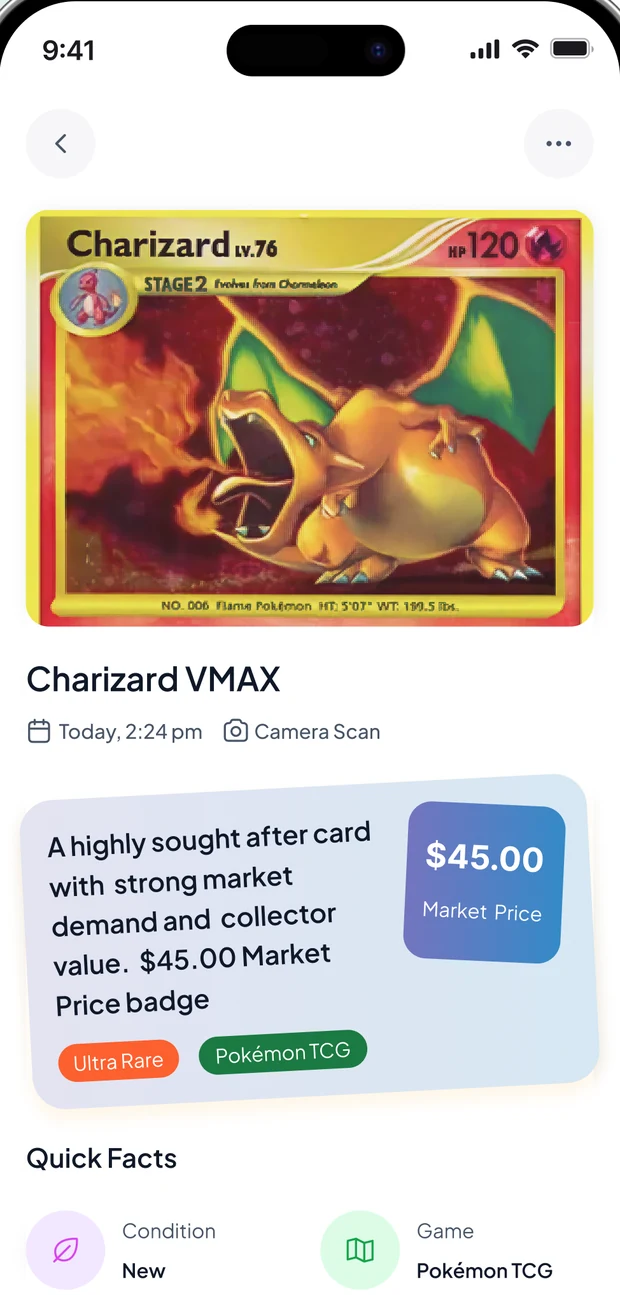
Professional grading costs real money and takes weeks. TCGBrain gives you an AI-assisted read on condition, rarity and collectibility in seconds — so you only send in the cards that are actually worth the submission fee.

  • Condition, rarity, collectibility A plain-language summary of what you are holding, not a wall of jargon.
  • Quick Facts panel Condition, game, set and identification markers at a glance.
  • Share my find Send the result to a trade partner or group chat in one tap.
  • An estimate, and it says so AI output can be wrong. It is a pre-screen, never a substitute for professional grading or appraisal.
TCGBrain card detail screen showing the card image, rarity and game tags and the Quick Facts panel
Portfolio

Your collection, finally organised

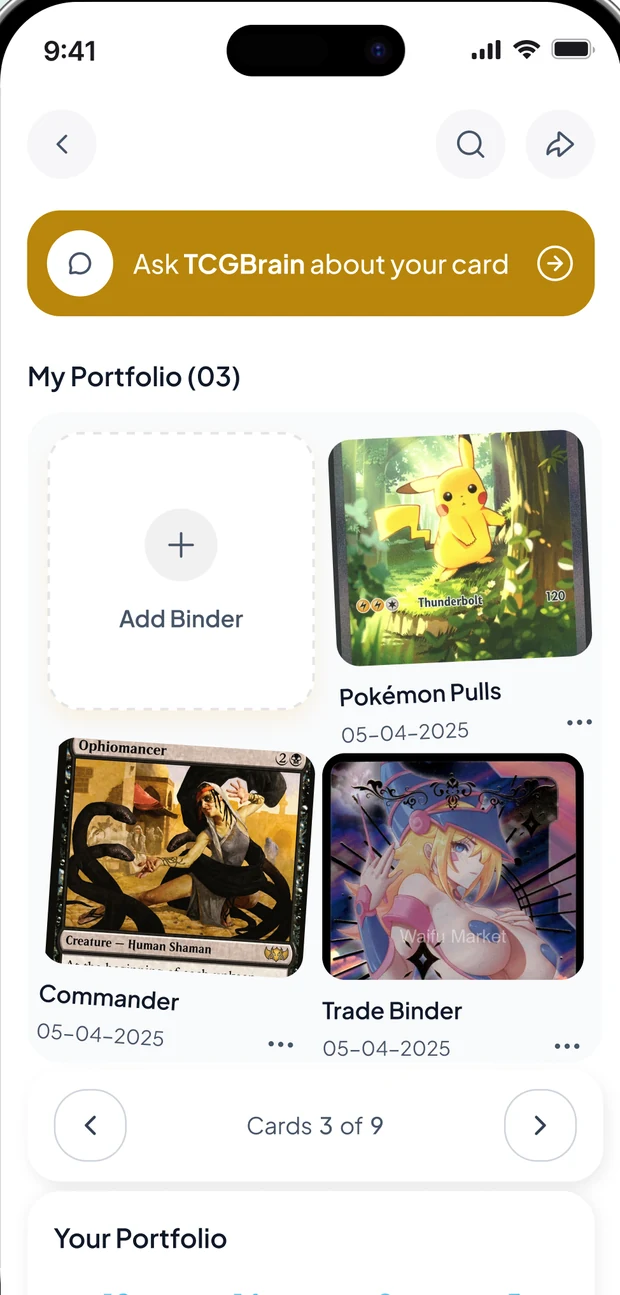
Every scan can go straight into a binder you named yourself — Pokémon pulls, commander staples, the trade pile. The portfolio total updates as the market moves, so you always know roughly what the shoebox is worth.

  • Binders on your terms Create as many as you like and move cards between them.
  • Live portfolio value Your collection total tracks the same market data the card pages use.
  • Recent scans, kept Everything you have identified stays in history — re-open it any time.
  • Synced to your account Sign in on a new phone and the collection is already there.
TCGBrain portfolio screen showing binders and the Ask TCGBrain shortcut
A quick tour

Straight from inside the app

Real screens, in the order you meet them: frame the card, read the value, check the condition, and ask when a scan will not land.

Scan screen with the card framed inside the capture rectangle
Frame it Zoom and drag until the card fills the rectangle.
Card screen with market price badge and pricing chart
Price it Market price, rarity and how it has moved.
Card detail screen with Quick Facts
Check it Condition, game, set and identification markers.
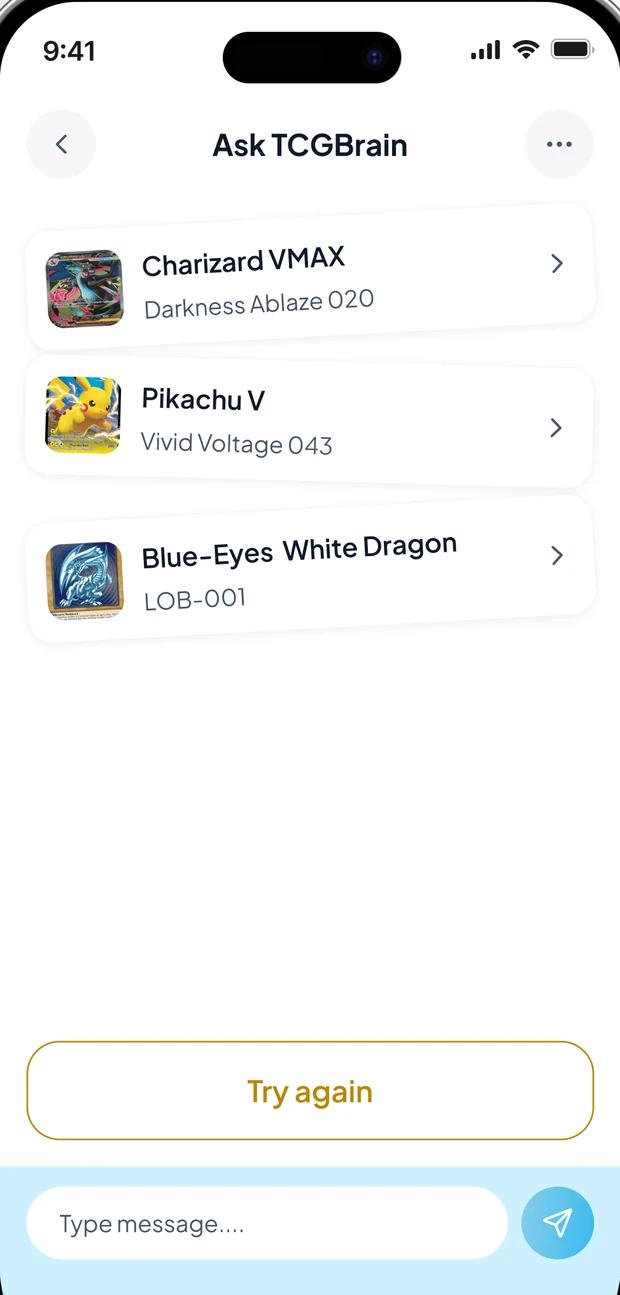
Ask TCGBrain screen listing candidate card matches
Ask it A shortlist when the camera cannot be sure.

Screens captured from the TCGBrain app. Card names, prices and dates shown are examples — the values you see in the app are the live ones for the card in your hand.

7-day free trial

Unlock TCGBrain free for 7 days

Start with a full week of Premium. Every scan, every price, every binder — no limits and no ads. Decide afterwards.

Start with the app

Subscriptions are sold and billed by the App Store or Google Play at the price shown there. A trial converts to a paid subscription unless you cancel beforehand, and you can cancel any time from your Apple ID or Google Play subscription settings.

  • Unlimited card scans No daily limits. One snap, instant ID.
  • Live market prices Real-time data, not outdated catalogues.
  • AI condition estimates Pre-screen before paying professional grading fees.
  • Portfolio tracker Live value updates and price alerts on any card.
  • Ad-free experience Clean scanning with zero interruptions.
FAQ

Questions, answered

The things collectors ask us before they download.

Pokémon TCG, Magic: The Gathering and Yu-Gi-Oh!. The identifier, the browse filters and the portfolio all understand the three games, so a card is filed with the right set, numbering and rarity language for its game.
Every match comes back with a confidence score so you can see how sure the app is. Identification is AI-assisted, and AI output can be incomplete or out of date — verify anything that matters, especially before buying, selling or grading. If a scan will not land, the built-in assistant can narrow the card down by asking you a few questions instead.
No. The condition read is an estimate designed to help you pre-screen a card before you pay a grading company. It is not a professional grade, an appraisal, or financial advice, and it does not authenticate a card.
Values are based on recent marketplace sales and compared across TCGPlayer, CardMarket and eBay, shown over 30-, 90- or 365-day windows. Markets move, so treat every figure as a current estimate rather than a guaranteed sale price.
Yes — an account is what lets your binders, portfolio and scan history follow you to a new phone. You can sign up with an email address, or continue with Google or Apple.
The app is free to download and Premium starts with a 7-day free trial. Subscription prices are set and billed by the App Store or Google Play, so the exact figure is always the one shown on the purchase screen in your region. Cancel any time from Settings → Apple ID → Subscriptions on iOS, or Play Store → Subscriptions on Android; access continues to the end of the paid period.
Camera and photo library access is used only for the action you asked for — a scan, a question, or saving a card image to your collection. The app never scans your library in the background. Images sent for identification are processed through our own server proxy and are not retained there after the answer comes back. Full detail is in the Privacy Policy.
English and Spanish today, switchable from Settings → Language. More languages are added as the app grows.
Download TCGBrain

Stop guessing what your cards are worth

Free to download, with a 7-day Premium trial. Point the camera at the first card in the pile and see what happens.

Coming soon on Google Play Soon Coming to the App Store Soon
Free to download 7-day Premium trial Cancel any time